
Training
The Training module tracks employee training sessions using a course catalogue and provider directory. For courses that grant certifications, mizuiro automatically calculates expiry dates and alerts you when renewals are coming up.
- Who can use it: managers always; supervisors when the setting permits. HR can record training company-wide, like a manager (the course and provider catalogue stays manager-only). Employees can view their own training records.
- Where: Sidebar → Training.
- Default: off. Enable it at Settings → Modules.
- Go to Sidebar → Training.
- Click Add training.
- Select the course from the catalogue and the employee (or multiple employees - see below).
- Set the start date and, if the training spans multiple days, an end date.
- Set the status: Scheduled (upcoming), Completed, or Cancelled.
- Choose the delivery method: in person, virtual, or hybrid.
- Optionally select a provider from the directory.
- Add location details and notes as needed.
- Click Save record.
Costs - tuition, hotel, travel - are filed in the Expenses module against this record’s reference number. mizuiro doesn’t track them in the training record itself.
If the course is set to require renewal, the expiry date is calculated automatically from the day the course finished and the course’s renewal period. You don’t need to enter it manually (you can override it on the record if the certificate says otherwise).
Each training record gets a reference number (TRN-DDMMMYY-XXXX).
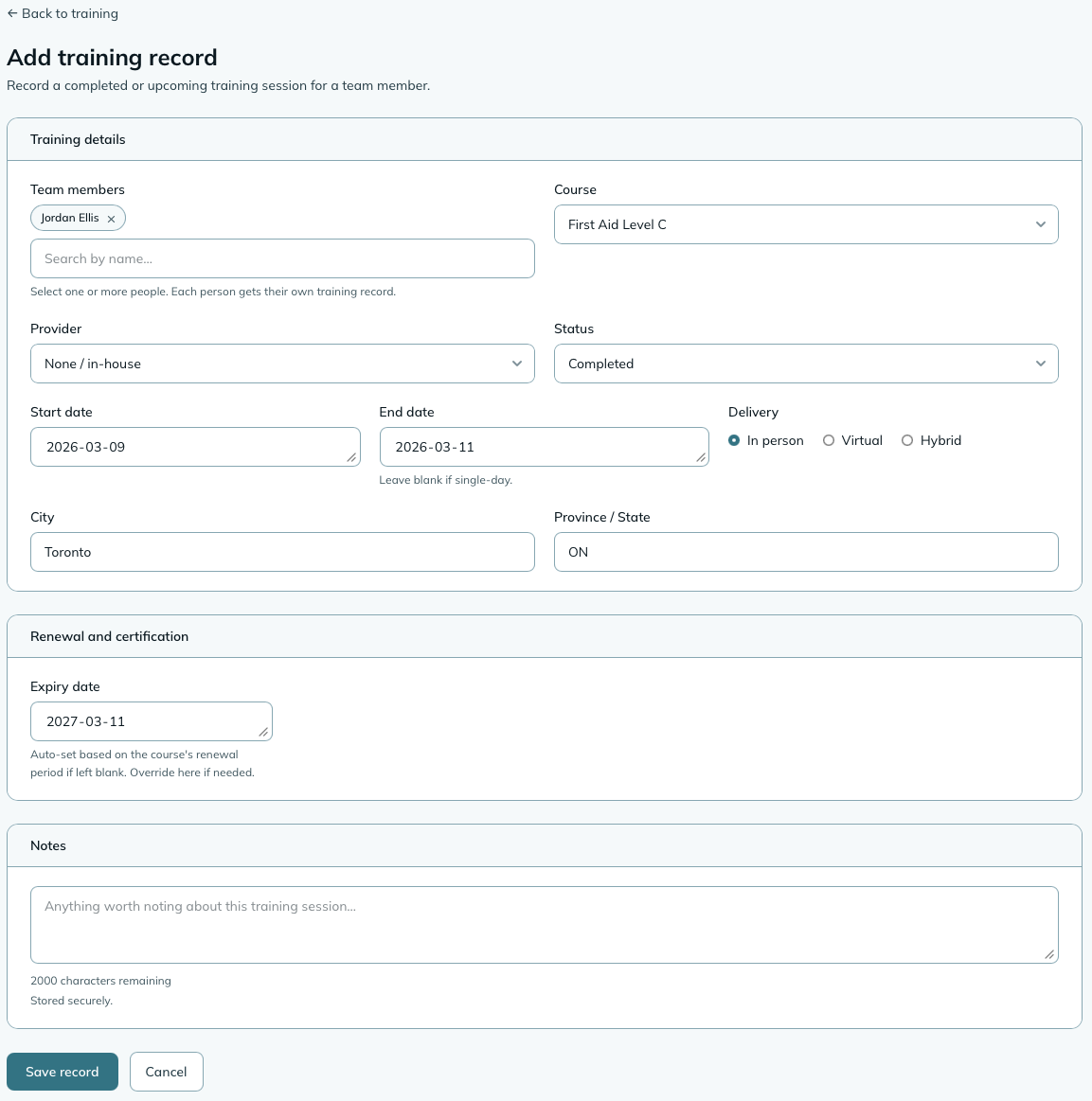
If a group of people are attending the same training, select all of them in the employee field when creating the record. mizuiro creates one record per person. Each can be edited individually afterward if the details differ.
The training list has an Expiring certifications section that surfaces records where a certification expires within the next 90 days. This section appears at the top of the list automatically - you don’t have to remember to check.
The Certifications Expiring dashboard widget does the same job from your dashboard.
Both only count the certificate that matters: the most recent completed one each person holds for a course. Once someone renews, their old record stops counting as expired, and cancelled training and people who have left the company are left out. The 30-day expiry emails and the Training Completion report’s expiry filters follow the same rule.
WarningExpiry alerts need two things on the course: requires renewal (with a renewal period, which is what produces the expiry date) and grants certification (which is what the 30-day expiry emails look for). A course with a renewal period but no certification flag still shows expiry dates on the list, but nobody is emailed. Set both on courses that grant a licence or qualification.
“Everyone in Warehouse needs Forklift” is a requirement: a course plus who must hold it, either everyone or the members of chosen teams. Renewal follows the course’s own renewal period, so a 36-month certification is required to be renewed every 36 months.
Training → Requirements shows, for the people you can see:
- Gaps at the top: anyone missing a required course or holding an expired one. That’s the list to act on.
- Each required course with a count per standing: current, expiring (within 90 days), expired, scheduled (a session is booked), due (a newcomer still inside the grace window), missing (past it).
Open a course to see everyone by name, worst first, with a Record training shortcut on each gap, and an Export CSV. The same standing shows on each person’s profile Training tab and, for employees, at the top of their own Training page as Your required training.
Newcomers get a grace window (30 days by default, set per requirement) counted from whichever came last: the day the requirement was added, the person’s hire date, or the day they joined an applicable team. Inside the window they’re due; after it they’re missing. So adding a requirement doesn’t turn the whole company red on day one, and neither does a new hire.
Managers add and edit requirements; supervisors see the standing of the people on their teams. Removing a requirement removes the expectation only; training records are untouched. A Training Gaps widget puts the missing-or-expired count on the dashboard.
Both the course catalogue and the provider directory are managed from one place: Settings → Training. Two ways to get there:
- From Sidebar → Training, click the Settings (gear) button in the top-right of the page header, or
- Open Settings → Training directly.
That page has two cards side by side - Course catalogue and Training providers - each with a Manage link. Both are manager-only.
NoteCourses and providers are two separate lists. Adding courses does not add providers, and the two don’t have to be set up in any particular order. A common point of confusion: after adding a few courses, the providers list is still empty until you add providers separately on the same Settings → Training page.
A provider is the organization that delivers training (for example, a college, the Red Cross, or an external trainer). To add one:
- Go to Settings → Training (or click the Settings gear on the Training page).
- On the Training providers card, click Manage providers.
- Click Add provider.
- Enter the provider name (the only required field), for example “Red Cross Canada”.
- Optionally add a website, a contact name, contact email, contact phone, and notes.
- Click Save provider.
The provider is now available to pick when you record a training session. You can edit a provider later, but one with existing training records can’t be deleted (the history is kept).
On the same Settings → Training page, use the Course catalogue card and click Manage courses, then Add course. Each course entry includes:
- Name, description, category, and course code.
- Delivery method: in person, virtual, or hybrid.
- Whether renewal is required, and if so the renewal period in months.
- Whether the course grants certification, and if so the certification name and designation.
Courses with existing training records can’t be deleted (to preserve the history), but you can edit them if the details change.
When you record a training session you pick a course, and can optionally associate it with a provider from the directory - which makes it easy to find all training delivered by a specific vendor later.
Settings → Training
When to warn about an expiring certification
30 days before (the default), 60 or 90. Pick more time if renewals take a while to book. Both expiring-certification emails, to you and to the person, follow it.
Who can record training
Whether supervisors can create and edit training records, or whether only managers can. Defaults to both.
Widget colour
Sets the accent colour for Training dashboard widgets.
| Widget | Size | What it shows |
|---|---|---|
| Certifications Expiring | 1x1 | A count of certifications that have expired or expire in the next 90 days, split into the two, with a link to the Training page. Only each person’s current certificate for a course counts. |
| Upcoming Training | 2x1 | Training sessions scheduled for upcoming dates with employee names and dates. |
| Training Gaps | 1x1 | People missing, or holding an expired, required course, among those you can see. Managers and supervisors. |
Can an employee see their own training records?
Yes. Employees can view their own records, including course details, dates, certification status, expiry date, and notes.
How does the expiry date get calculated?
When you save a training record for a course with a renewal period, mizuiro adds the renewal period in months to the day the course finished and sets that as the expiry date. For example, a course with a 24-month renewal period that ran June 1 to 3, 2026 would expire June 3, 2028. A one-day course counts from that day.
If you correct the training’s dates later, the expiry moves with them. If you make a course renewable after people already have records for it, their records get an expiry worked out the same way, so nobody reads as current just because their training predates the rule.
What if the certification expires on a date I need to override?
The expiry date is set automatically based on the course’s renewal period. If you need to adjust it (for example, the actual certificate has a different expiry), edit the training record and change the date directly. A date you type yourself stays put, even if you later correct the training’s dates.
Can I delete a course from the catalogue?
Only if no training records reference it. If anyone has a training record for that course, the catalogue entry can’t be deleted. Edit the course details if something has changed, or archive the provider if the course is no longer offered.
Can I record training for something not in the catalogue?
You’ll need to add the course to the catalogue first. This keeps your training history consistent and makes it easier to filter and report by course later.
I added courses but I can’t find where to add a provider.
Providers are a separate list from courses, on the same settings page. Go to Settings → Training (or click the Settings gear on the Training page), find the Training providers card, and click Manage providers → Add provider. Adding courses doesn’t create providers - you add them separately. See “Add a training provider” above.
NoteHow to read this: ✓ can see it, ✗ can’t, ○ depends on a setting or condition (explained under the table). As a manager, you always see everything in your company.
| What | You (manager) | Supervisor | Employee |
|---|---|---|---|
| Training records | ✓ | ○ | ✓ (own only) |
| Notes | ✓ | ○ | ✓ (own only) |
| Certification / expiry | ✓ | ○ | ✓ (own only) |
| Create / edit | ✓ | ○ | ✗ |
- ○ Supervisor: in shared scope, supervisors see all training records. In assigned scope, supervisors see their own records plus their team members’. Whether supervisors can create records is a Training module setting.
- Employee: employees see their own training records, including course details, dates, certification status, expiry date, and notes. They cannot create or edit records.