
Conferences
The Conferences module tracks employee attendance at external conferences and seminars. You maintain a catalogue of recurring conferences in settings, then record individual attendance with dates, location, and notes. Costs - hotel, travel, registration - are filed in the Expenses module and tied back to the attendance via its reference number.
- Who can use it: managers always; supervisors when the setting permits. Employees can view their own conference records.
- Where: Sidebar → Conferences.
- Default: off. Enable it at Settings → Modules.
- Go to Sidebar → Conferences.
- Click Add conference.
- Select the conference from the catalogue and the employee (or multiple employees - see below).
- Set the start date and duration. The conference catalogue entry has a default duration that pre-fills the field; adjust it if this occurrence is different.
- Add the city and region if relevant.
- Add any notes.
- Click Save attendance.
Each attendance record gets a reference number (CNF-DDMMMYY-XXXX). That number is the
main thing the employee shares with finance or files alongside their itinerary and
receipts wherever your team normally stores supporting documents.
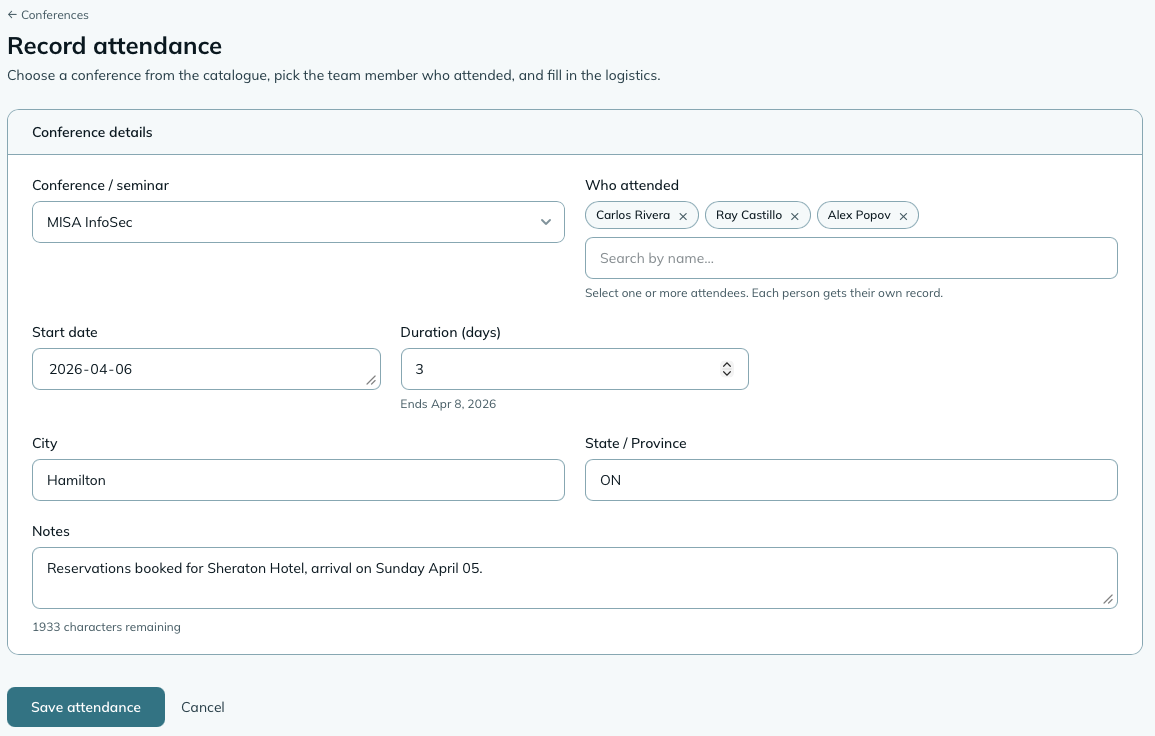
If several people are attending the same conference, you can create records for all of them in a single form submission. The employee selector accepts multiple people, and mizuiro creates one attendance record per person. Each record can be edited individually afterward if the details differ between people. To add more people later, open any one of their records, click Edit attendance, and use Add more attendees: each new person gets their own record with the same conference, dates, and location.
Supervisors can only record conferences for the people they look after (their own teams, or everyone in shared scope) and themselves.
A conference stays in the Upcoming list until its last day is over. While it’s running it’s marked On now, on the list, the record, and the Upcoming Conferences widget. It moves to Past the day after it ends.
The catalogue lives in Settings → Conferences → Conference & seminar catalogue. Each entry defines a conference - its name, the organizing body, a default duration in days, and an optional website link.
Catalogue entries are reusable. The same conference can appear many times in the attendance list (once per year, once per person), all referencing the same catalogue entry.
You can archive catalogue entries for conferences you no longer attend. Existing attendance records are unaffected.
Settings → Conferences
Who can record attendances
Whether supervisors can create and edit conference records, or whether only managers can. Defaults to both.
Widget colour
Sets the accent colour for Conferences dashboard widgets.
| Widget | Size | What it shows |
|---|---|---|
| Upcoming Conferences | 2x1 | Conferences on now or starting in the next 30 days, with dates and names. Everyone sees this one, showing the same records they’d see on the Conferences page: a manager sees the company’s, a supervisor the people they look after, and the person going sees their own. |
| Attendees This Year | 1x1 | Conference attendances this calendar year, and how many different people went, from the records you can see. |
Can an employee see their own conference records?
Yes. Employees can view their own records, including dates, location, and notes.
Can I delete a conference from the catalogue if it has attendance records?
No. A catalogue entry that has existing attendance records can’t be deleted. You can archive it instead, which removes it from the selection list for new records while keeping the history intact.
How do I record a conference that’s not in the catalogue yet?
Add it to the catalogue first at Settings → Conferences → Conference & seminar catalogue, then come back to record the attendance.
NoteHow to read this: ✓ can see it, ✗ can’t, ○ depends on a setting or condition (explained under the table). As a manager, you always see everything in your company.
| What | You (manager) | Supervisor | Employee |
|---|---|---|---|
| Conference attendances | ✓ | ○ | ✓ (own only) |
| Notes | ✓ | ○ | ✓ (own only) |
| Create / edit | ✓ | ○ | ✗ |
- ○ Supervisor: in shared scope, supervisors see all conference attendances. In assigned scope, supervisors see their own attendance records plus their team members’. Whether supervisors can create and edit records is a Conferences module setting, and they can only record them for the people they look after.
- Employee: employees see their own conference records, including notes. They cannot create or edit records.