
Sign up
This is the first step on the way to a working mizuiro company account. It takes about five minutes and it’s mostly typing.
- A working email address that you can check right now (the confirmation will arrive there straight away).
- A password you can remember, or a password manager that will remember it for you.
- A laptop or desktop. The signup flow includes setting up two-factor authentication, which requires scanning a QR code with your phone. Doing both steps on the same device gets awkward quickly - it’s much smoother when your phone is the authenticator and your computer is where you’re signing up.
-
Go to mizuiro.app and click Sign up.
-
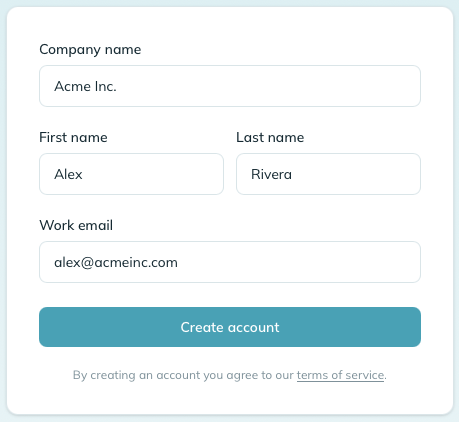
Fill in your company name, your name, and your work email.
-
Read the terms of service and the privacy policy, then tick the box confirming you agree to both. Both links open in a new tab so you can go through them without losing your place on the form.
Please actually read them. They’re written to be understood, not to be skipped, and they describe how mizuiro handles the data you and your team put into it - what we collect, why we collect it, how long we keep it, and what you can ask us to do with it. That’s the shape of the working relationship between your company and ours, and we’d rather you know it up front than find out later. The Create account button won’t take an unchecked form.
When your account is created, mizuiro emails you a dated PDF copy of both the terms of service and the privacy policy, exactly as they read at that moment. Keep it: if we ever update either document, that attachment is your own record of the version you originally agreed to.
-
mizuiro sends you a confirmation email. Click the link in it and set your password on the page it lands you on.
-
You’ll then be sent to the setup wizard - four short questions that lock in a few company-wide behaviours before you get to the dashboard.
Notemizuiro says “company” throughout, but that’s just the label for the group you’re running. It works equally well for a department, a team, a division, a branch, a nonprofit, or any other group of people you look after - put whatever name fits in the company field. If you’re setting mizuiro up for one part of a larger organization, see running mizuiro for more than one group below.
You’re now the Primary Manager of a brand new mizuiro company workspace. That gives you full access to everything in the app, plus the ability to invite supervisors, employees, and other managers (the last group will be added as read-only Observers). The next page walks through telling mizuiro about your company, and the page after that gets into inviting people.
mizuiro is built around a single group of people under one leader: one Primary Manager and the people they look after. That shapes how it works for a larger organization.
If your organization has several departments that each run themselves - say Finance, Engineering, and Support, each with its own department head - they don’t all have to share one workspace. Each department can sign up on its own, and every sign-up creates a separate, self-contained mizuiro instance:
- Each has its own Primary Manager (that department’s leader).
- Each has its own people, records, settings, enabled modules, and billing.
- The instances are completely walled off from one another. One department’s manager can’t see another’s people or records, and nothing is shared between them.
Within a single instance, you organize people into teams led by supervisors - that’s how you reflect smaller groups that still all roll up to the same leader. So a good guideline:
- One leader over everyone? One instance, with teams inside it.
- Several departments, each with its own leader and its own books? A separate sign-up (a separate instance) for each.
Because the instances are separate, give each one a name that tells them apart at a glance - for example “Acme Finance” and “Acme Engineering” rather than just “Acme” twice.
NoteEach instance needs its own manager email. An email address can belong to only one mizuiro account, so each department’s Primary Manager signs up with their own work email. The same person can’t be the Primary Manager of two instances using the same email - use a different email for each, or hand the sign-up to that department’s actual lead.
The confirmation email didn’t show up.
Check your spam folder first, since work email systems are often aggressive about anything coming from an unfamiliar sender. If it’s still missing after a couple of minutes, go back to the sign-in page and ask for a fresh confirmation email.
I got the email but the link’s expired.
Confirmation links expire after 24 hours so they can’t be reused indefinitely if the email gets forwarded somewhere it shouldn’t. Sign in with your email and password and mizuiro will send a fresh one.