
Kikubari
Kikubari (気配り) is a Japanese concept meaning considerate attentiveness - noticing what someone needs before they say it. In mizuiro, that means keeping a rich profile for each person on your team: their hobbies, dietary restrictions, allergies, coffee order, shirt size, and a fun fact about them.
The module has three surfaces: individual profiles you fill in per person, a team insights page that aggregates everything in one view, and a tag lookup so you can find everyone who shares a specific preference or need.
- Who can use it: managers and supervisors manage profiles and view the insights page. Employees can contribute their own data through get to know you polls, but can’t directly edit their profile.
- Where: Sidebar → Kikubari for the team view; individual profiles are accessible from each person’s profile page.
- Default: off. Enable it at Settings → Modules.
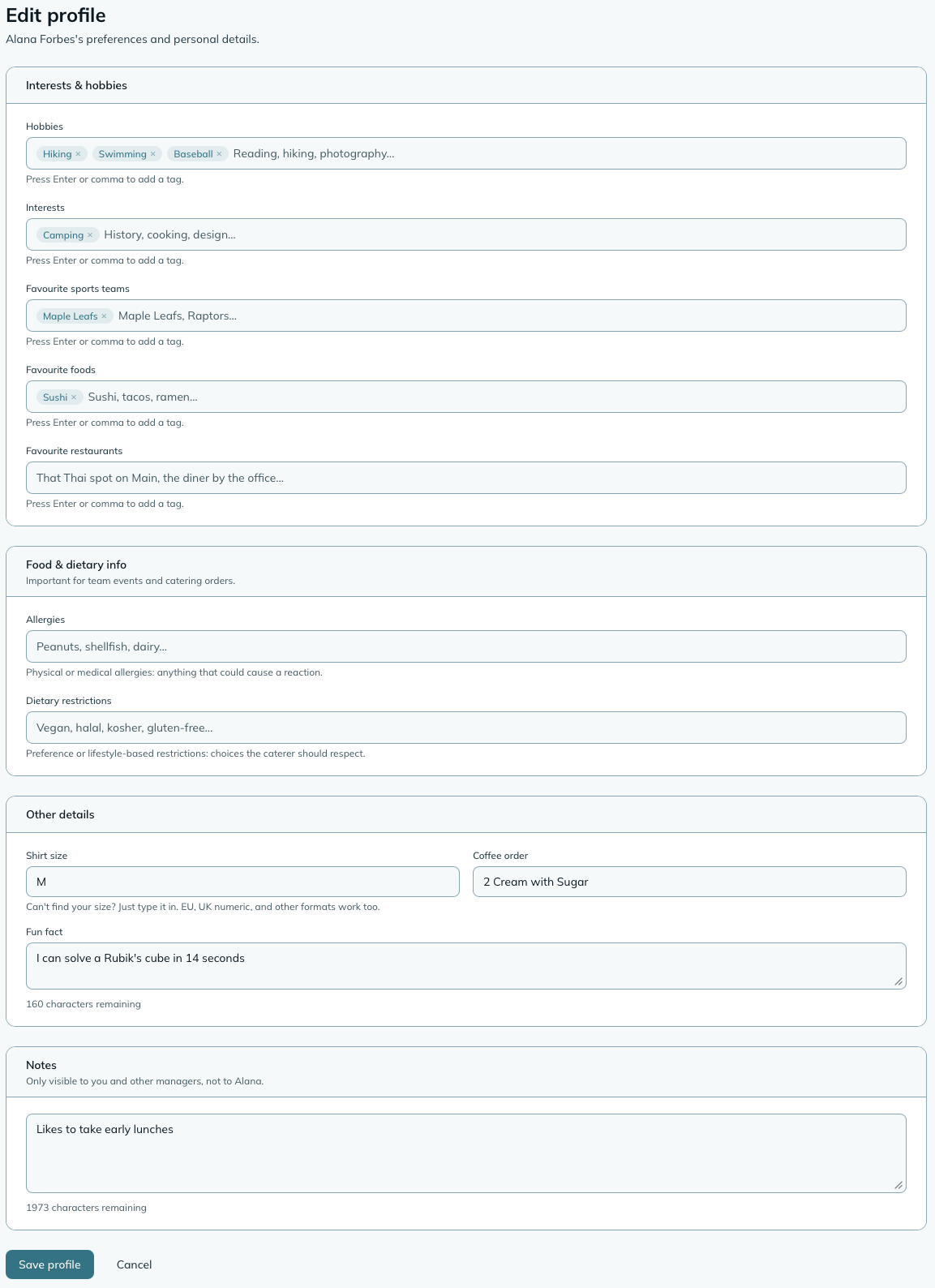
Each person on your team has a Kikubari profile, accessible from their profile page under the Kikubari tab.
The profile has two kinds of fields:
Tag fields - things that can have multiple values, stored as searchable tags:
- Hobbies
- Interests
- Favourite sports teams
- Favourite foods
- Allergies
- Dietary restrictions
Details - single-value fields:
- Shirt size
- Coffee order
- Fun fact
There’s also a Notes field that only managers and supervisors can see. Use it for context you want to keep handy but that isn’t the employee’s own information to see. A supervisor never sees the notes kept about themselves, including when they edit their own profile.
Tags are auto-suggested from what you’ve already entered for other people on your team, so common entries (like dietary restrictions) stay consistent without you having to type the same thing every time.
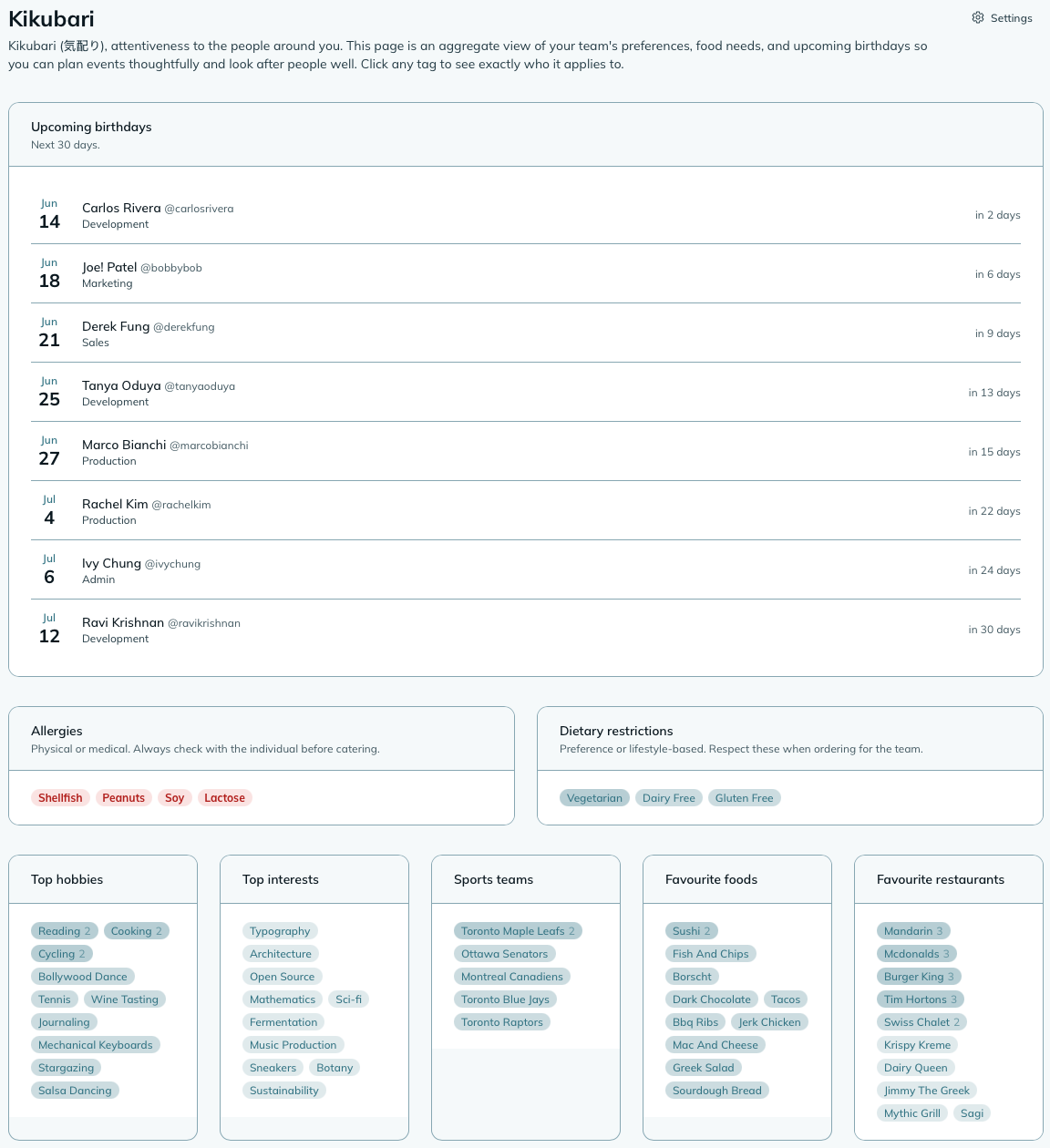
Sidebar → Kikubari takes you to the team view. This is the page to open before a team lunch, a holiday party, or any event involving food or gifts.
The insights page shows:
- Upcoming birthdays - everyone with a birthday in the next 30 days, including family members if you’ve enabled that option.
- Allergies - displayed prominently in red, so you see them at a glance before planning anything food-related.
- Dietary restrictions - vegetarian, vegan, halal, kosher, gluten-free, and anything else on file.
- Top tags by category - the ten most common entries per field across your team, heat-mapped by popularity. Useful for spotting what your team actually has in common.
Each tag on the insights page is a link. Click it to go to the “Who has this?” page for that tag.
WarningTreat Kikubari as a starting point, not a final answer. The allergy and dietary information on file is only as current as the last time someone updated their profile. Before making any significant decision - catering an event, placing a group food order, planning a team dinner - confirm directly with your team members. A quick “anything I should know about before I order?” goes a long way, and it’s the kind of attentiveness Kikubari is here to support, not replace.
The “Who has this?” lookup appears when you click any tag on the insights page. It shows everyone on your team who has that tag in their profile, so you can answer questions like “who’s vegetarian?” or “who do I need to talk to about the catering?” without scrolling through individual profiles.
A confetti animation and banner appear on the dashboard on someone’s birthday. Whether you see it is your own preference (Settings → Preferences → Celebrate birthdays), not a team-wide switch. The only part a manager decides is whether family birthdays from Kikubari profiles are surfaced at all, via the Birthday scope setting below.
Employees are celebrated company-wide, but family birthdays only show on managers’ and supervisors’ dashboards, the same audience as the Upcoming Birthdays widget: they come from Kikubari, which employees don’t see. People who have left aren’t celebrated or listed. Someone born on 29 February is celebrated on the 28th in years without a 29th.
Employees can’t edit their Kikubari profile directly. Instead, they contribute their preferences through get to know you polls - a poll type in the Polls module where you ask your team to share their allergies, dietary restrictions, food preferences, and other details. Their answers write automatically to their Kikubari profiles.
This design keeps things structured and prevents employees from seeing the manager-only notes field.
Settings → Kikubari
Birthday scope
Controls whether family members’ birthdays are surfaced, on the insights page, in the Upcoming Birthdays widget, and in the dashboard celebration. Employee and contact birthdays are always included:
- Employees only - just the people on your team (default).
- Employees and family - includes family members you’ve added to an employee’s connections. Useful if your team culture includes celebrating family milestones.
Widget colour
Sets the accent colour for the Kikubari dashboard widget.
| Widget | Size | What it shows |
|---|---|---|
| Upcoming Birthdays | 2x1 | The next five birthdays within the coming 30 days, with a link to the full insights page. Respects the birthday scope setting. |
Can an employee see what I’ve written in their Notes field?
No. The Notes field is only visible to managers and supervisors. It doesn’t appear anywhere in the employee’s view, and it’s not included if a review or report is shared with them.
What if an employee wants to update their own preferences?
Send them a get to know you poll. Their responses write directly to their Kikubari profile, and they can update their response at any time to change what’s on file. If you have the Polls module enabled, this is the standard way to collect and keep that information current.
Can I track family members’ birthdays?
Yes. On each employee’s profile page you can add connections (family members or significant people in their life) with a relationship type and optional birthday month and day. Whether those birthdays appear on the insights page depends on your Birthday scope setting.
Are allergies and dietary restrictions visible to employees?
The aggregated view (the insights page and food safety panels in Polls) shows dietary information by name to managers, and to supervisors for the people on their teams. Everyone else viewing a food-related poll, including an employee who organised it, sees an anonymized list of dietary needs without names attached.
NoteHow to read this: ✓ can see it, ✗ can’t, ○ depends on a setting or condition (explained under the table). As a manager, you always see everything in your company.
| What | You (manager) | Supervisor | Employee |
|---|---|---|---|
| Insights page | ✓ | ○ | ✗ |
| Employee profiles | ✓ | ○ | ✗ |
- ○ Supervisor: in shared scope, supervisors see insights for all employees. In assigned scope, supervisors see only their own team members.
- ✗ Employee: employees have no access to the Kikubari module.