
Setup wizard
After you confirm your email and set a password, mizuiro walks you through a short four-step wizard so a few key company-wide behaviours are locked in before you get to the dashboard. You only see this once. Three of the four choices can be adjusted later from Settings, so you don’t have to get everything perfect today. The one that’s permanent is called out below so you know to think it through.
- Recovery codes - eight one-time fallback codes for getting back into your account if you lose your authenticator device.
- Supervisor scope - whether supervisors act on everyone or only on the people in their teams. Permanent - can’t be changed afterwards.
- Email notifications - whether new people receive an invitation email the moment you add them, or you hold off until you’re ready to invite everyone at once.
- A quick favour - one optional question about how you heard of mizuiro. Skippable.
We’ll walk through what each one means, what’s configurable later, and what isn’t.
Every mizuiro account uses two-factor authentication. You log in with your password, then approve the login with the six-digit code from your authenticator app (Google Authenticator, 1Password, Authy, etc.). It’s mandatory, no opt-out.
So what happens if your phone dies? Or you wipe it for a new one without exporting the codes? Without a fallback, you’d be locked out of your own company.
That fallback is the recovery codes. mizuiro generates eight of them at this step. Each one is a one-time pass that lets a manager sign in instead of the authenticator code, just for that one login. The code is burned the moment it’s used - you can’t use the same one twice.
You only see all eight at once on this screen. Save them somewhere safe and offline now - a password manager entry, a printed copy in your office safe, both. Don’t email them to yourself or stick them on a sticky note. If you lose them and your authenticator device, the only way back in is to contact mizuiro support.
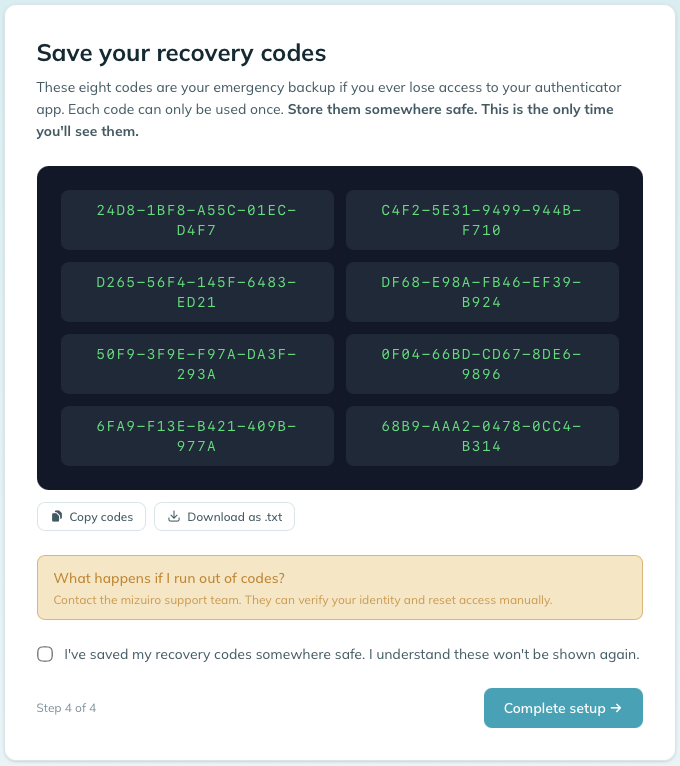
You’ll be asked to tick a confirmation before moving on, so mizuiro knows you’ve actually saved them somewhere. Don’t tick it until you have.
Running low? Recovery codes are issued once, during setup, and can’t be regenerated from the Security page. If you’ve used all eight, contact mizuiro support to have a fresh set issued.
This is the one wizard question that cannot be changed later, and it’s worth pausing on. On screen you’ll see two options:
- Assigned teams: each supervisor can only take action on employees in the teams they’re assigned to. A supervisor leading the Sales team can manage Sales people, not the Engineering team.
- All employees: any supervisor can act on any employee in the company. Best for smaller teams where the supervisor layer functions more like a management layer.
WarningPick with some care, then move on. If you’re not sure, Assigned teams is the safer default. It keeps the scope narrow now, and you can always give individual supervisors broader reach by adding them to more teams as needed. Going the other direction, starting with All employees and trying to narrow later, is the case that doesn’t work.
If you pick Assigned teams, here’s how a few situations that come up again and again actually play out.
A supervisor needs to cover for someone else temporarily - maybe a peer is on vacation, on parental leave, or out sick.
Under this scope, the answer is: add the covering supervisor to the other team for the duration of the coverage, then remove them when the original supervisor is back. Team membership is the lever, not the scope. You can do this from Settings → People → [the covering supervisor] → Teams, and you don’t need to wait for anything; the scope adjusts as soon as you save. When they no longer need access, remove them from the team.
There’s no audit trail penalty for adding and removing somebody from a team - it’s a routine management action, not an exception.
A supervisor runs more than one team permanently. Same answer: they sit on every team they’re responsible for. A supervisor can be on as many teams as makes sense, and their accessible-people set is the union of those teams’ members.
A team has more than one supervisor. Also fine. Add as many supervisors to a team as makes sense. They all see the same people and either one can take action - mizuiro doesn’t make one “primary” and the others secondary.
An employee moves between teams. Move them in Settings → People → [employee] → Teams. The previous supervisor immediately loses access; the new supervisor immediately gains it. Records already created (touchpoints, reviews, incidents) stay with whoever filed them - they don’t migrate.
A senior supervisor needs eyes on everything without being “the manager.” That’s what an Observer is for. Observers are read-only manager accounts; they see everything across the company but can’t edit. You add observers from Settings → Team → Observers (manager only).
It’s tempting to pick All employees because it feels more flexible, but the right question is: would your supervisors be uncomfortable filing a performance concern, an incident, or a touchpoint that shows up to a peer who isn’t involved? If yes, pick Assigned teams. If no - if your supervisors operate as a single tight management group with no internal information barriers - the shared scope makes day-to-day work less administrative for you.
The shared scope is most common at companies under ~20 people where every supervisor really is helping look after everyone. Past that size, almost every company benefits from Assigned teams.
The third step asks a simple question: when you add someone to mizuiro, should they receive an invitation email right away, or should you hold off?
- Send invitation emails - the standard flow. Turns mizuiro’s notification emails on, so the people you add can be sent an invitation with a link to set up their account. Pick this if you’re ready to bring your team in as you add them.
- Hold off on emails for now - mizuiro sends no notification emails yet. Useful if you want to get everyone into the system first and invite them later, or if you’re still preparing internal communications.
Configurable from Settings → Notifications at any time. This is the main on/off switch; once it’s on you choose exactly which emails go out (invitations, calendar invites, and more). See Notifications for the full picture. Flipping to “send” later doesn’t backfill invitations for people already added silently - you send those manually when you’re ready.
The fourth step is a single optional dropdown: how did you hear about mizuiro? We’re a small team and word of mouth helps, so it’s an honest ask, not a marketing funnel. It’s completely optional - leave it set to “Prefer not to say” if you’d rather skip - and anonymous on our end.
There’s no wrong answer here and no consequence to picking any option. This is the final step - clicking Continue completes the wizard and takes you to your dashboard.
The wizard intentionally keeps the runway short. There are a few company-wide settings it doesn’t ask about but you’ll want to customize before you invite your team in. All of these live in Settings and take a minute each.
Set from Settings → Company. mizuiro used your registration form value as a starting point; adjust it if the display name should read differently in the app.
mizuiro has three role tiers built in. By default they’re called Manager, Supervisor, and Employee, but you can rename them to fit your organization’s vocabulary. Director / Lead / Associate works. Partner / Manager / Team member works. Whatever your team actually calls these roles, use that here.
Set from Settings → Company. A rename flows through the entire app immediately. Existing records keep working; they just pick up the new label.
In the same spirit, you can rename the word “Company” itself. If you’re running mizuiro for a single department, division, or branch of a larger organization, “Company” can feel off. Set your own singular and plural (for example Department / Departments, or Division / Divisions) under Settings → Company, and the word updates across the app. Legal and billing wording always stays “Company”, and this doesn’t change your organization’s actual name.
The work week tells mizuiro which days count as “working” for things like overdue calculations, the Today widget on the dashboard, and the default range on filters. Monday to Friday is the default and fits most teams.
This doesn’t restrict who’s allowed to work when. An employee can have a schedule that includes Saturdays without any issue. The setting just tells mizuiro which days are “normal” for company-wide views.
Set from Settings → Company. A change takes effect immediately for new calculations.