
Inviting your team
mizuiro doesn’t have an opinion about what order you add people in. Some managers prefer to set up the team structure first - creating the supervisor accounts and assigning teams - before adding any employees, so everyone lands in the right place from the start. Others prefer to build the roster first and sort out reporting structure afterward. Either approach works, and you can mix them if part of your team is easier to add in bulk than in pieces.
NoteOnly managers can invite people to mizuiro. Supervisors manage their team once everyone’s in the app, but sending invitations is a manager action.
- Supervisors lead one or more teams. They can do most things managers can do, scoped to their team.
- Employees are everyone else in your company. They have a profile, can be assigned tasks, log presence, respond to polls, and so on.
- HR look after everyone’s HR records company-wide - performance, presence, incidents, kudos, training, and reports - but nothing outside those areas. They’re a “mini manager” for the HR side of things, and they aren’t assigned to teams because they cover the whole company. See Who sees what for exactly what an HR user can reach.
- Observers are read-only managers. Useful for an executive or an auditor who needs the full picture but shouldn’t be changing anything.
- Go to Sidebar → People.
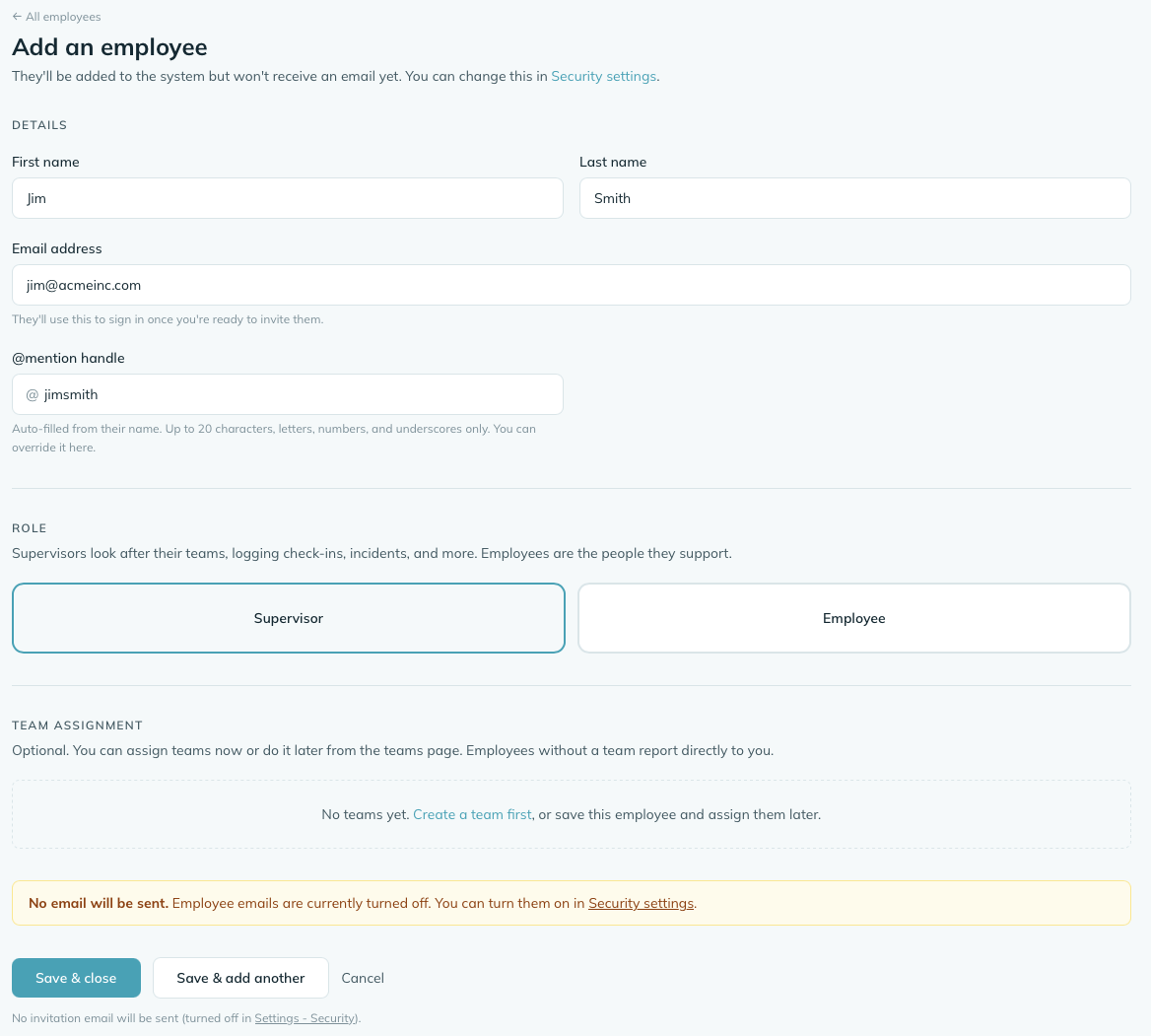
- Click Add employee (top right).
- Fill in first name, last name, and work email. mizuiro suggests an @mention handle based on the name; leave it or override it. Pick a role (supervisor, employee, or HR) and tick any teams they belong to - people can be on more than one team, or on none if they report straight to you. (HR aren’t team-assigned, so any teams you tick are ignored for them.)
- Add a hire date if you know it. It’s optional - leave it blank if you’re not sure, and you can fill it in later. Adding someone who’s been with you for years? Just skip it or put their real start date; mizuiro won’t assume anything.
- If your company uses probation periods, you’ll see a Start this person on a probation period checkbox. It’s off by default, so people you add aren’t put on probation unless you say so. Tick it only for an actual new hire - when you do, a hire date is required, and mizuiro works out when their probation ends from it.
- Click Save & close, or Save & add another to start on the next person without leaving the form. If invitation emails are turned on, mizuiro sends the new hire theirs right after the save.
If you have a spreadsheet of your team already (or can ask HR for one), use the Import CSV button on the People page. Download the template, fill it in, upload it back. mizuiro previews who’s about to be invited and you confirm before any emails go out.
The template also has optional team, hire date (hired_on),
probation (on_probation), job title and employee number
columns; the required ones are first name, last name, email and tier. Leave on_probation blank
or set it to no for anyone who isn’t a brand-new hire - that’s the
default. Set it to yes only for a real new starter, and give
that row a hire date so mizuiro can work out when probation ends.
A yes without a hire date (or when your company doesn’t use
probation) is flagged in the preview so you can fix it before
anyone is created.
The file is formatted incorrectly. If the CSV doesn’t match the expected columns or has unparseable rows, mizuiro stops before importing anything and tells you which rows have problems. Fix the file and upload it again - nothing is created until you confirm the preview.
Some rows fail while others succeed. If individual rows have issues (a missing required field, an unrecognized role name), those rows are skipped and flagged in the results summary. The valid rows are still imported. You can fix the failed rows and re-upload just those people.
You try to import someone who’s already in your directory. If an email address in the CSV matches someone already in your company, that row is skipped. The existing account isn’t changed. You’ll see a note in the results so you know which ones were skipped and why.
The person you invited gets a short email with a link to set their password and finish their profile. The first time they sign in they’re also walked through 2FA setup, which is the same flow you went through when you first signed up.
One thing to check first: that invitation email only goes out if the matching notification is switched on for their role under Notifications, and if your login mode lets them sign in at all. If it’s turned off, the person is still added to your directory but receives nothing - so if you’re expecting them to get an invite, make sure the notification is enabled before you add them.
Invitations stay valid for 72 hours. If someone doesn’t accept in time - they were out when the email arrived, or it went to spam - the link they were sent stops working and they’ll see an “invitation expired” message if they click it. Open their profile and click Resend invitation in the top-right corner; a fresh 72-hour link goes out and the old one stops working right away. No need to delete and re-add them - everything you’ve already filled in for that person stays put.
You can edit anyone’s role, team, or name from their profile page later, so don’t worry too much about getting it perfect at invitation time. You can also deactivate a person and reactivate them later if they leave and come back; their existing data sticks around, the account just goes dormant in the meantime.
The one thing that’s harder to undo is a typo in the email address, since the invitation will have gone to the wrong inbox. Edit their profile and fix the email, then click Resend invitation on the profile page. The new email goes to the corrected address and the link sitting in the wrong inbox stops working immediately.