
Kudos
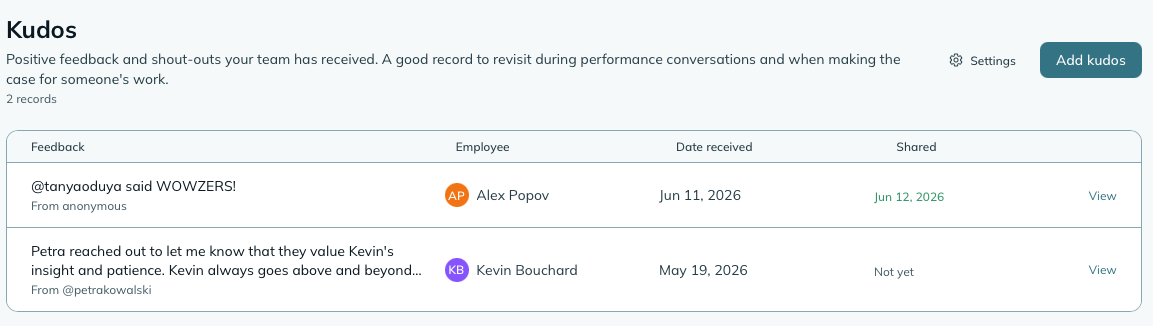
Kudos is where you record positive feedback about your team: a compliment from a client, praise from a colleague in another department, feedback that came in during a meeting. Each record captures what was said, where it came from, when it was received, and when you shared it with the employee.
- Who can use it: managers always; supervisors when the setting permits. HR can record kudos company-wide, like a manager. Employees can view their own kudos.
- Where: Sidebar → Kudos.
- Default: off. Enable it at Settings → Modules.
- Go to Sidebar → Kudos.
- Click Add kudos.
- Choose who it’s for: one person, or a whole team.
- Enter the source - who the feedback came from (a name, a client, a team, whatever makes sense for your record).
- Set the received on date - when you actually got the feedback.
- Write the body - what was said, in their words or paraphrased.
- Click Save kudos.
Each kudo gets a reference number (KDO-DDMMMYY-XXXX).
Kudos for a whole team. Feedback often arrives about a team rather than a person. Pick A whole team and the same kudos is recorded for everyone on it, supervisors included, each as their own record: it shows on their profile, carries its own reference number, and counts in the Recognition Summary report exactly as a single one would. Anyone who has left is skipped. Managers and HR can pick any team; supervisors pick from the teams they run, and can only record kudos for the people they look after.
Recording a kudo and actually sharing it with the employee are two separate steps. Sometimes feedback comes in and you want to wait for the right moment to pass it on. Sometimes you share it on the spot.
When you’re ready, open the kudo and click Mark as shared. mizuiro records the date you shared it. If you marked it too early or by accident, you can unmark it.
This creates a simple accountability trail: you can see at a glance which kudos have been passed on and which ones are still sitting in the queue.
If you enable the announcement feature, a confetti celebration appears on each person’s dashboard the next time they sign in, for kudos recorded in the past week. Everyone in the audience sees it, once each. It doesn’t depend on marking the kudo as shared, and it doesn’t mark it shared either: that stays your own record of passing the feedback on. Keep this in mind if you prefer to hold off on sharing feedback with the employee until the right moment: the announcement to the team goes out as soon as it’s recorded. The celebration is visible to either the whole company or just the employee’s team, depending on your settings. This is off by default; turn it on if your team culture would appreciate the public recognition.
The announcement indicates that the employee received positive feedback, not the content of the feedback itself. The actual text of the kudo stays private to managers and supervisors. This means you can celebrate someone publicly without sharing details that may be sensitive or that the employee might prefer to hear from you directly first.
You can configure the announcement scope in Settings → Kudos.
Settings → Kudos
Who can record kudos
Whether supervisors can create and edit kudo records, or whether only managers can. Defaults to both.
Announce on dashboard
When on, new kudos trigger a confetti banner on the dashboard. Off by default.
Announcement visibility
Whether the announcement appears for everyone in the company or only for people on the employee’s team. Only relevant when announcements are enabled.
Widget colour
Sets the accent colour for the Kudos dashboard widget.
| Widget | Size | What it shows |
|---|---|---|
| Recent Kudos | 2x2 | Recent kudo records with the employee name, source, and date received. |
Can an employee see their own kudos?
Yes. Employees can view their own kudo records, including the source and the body. They can’t see the shared/unshared status or any manager notes.
Does marking a kudo as shared notify the employee?
No. Marking as shared is a record-keeping action for you - it tracks when you passed on the feedback, but mizuiro doesn’t send the employee a notification. Sharing the feedback in person or in a touchpoint is still on you.
Can I record a kudo for a supervisor about their own team member?
Yes. Supervisors with permission can record kudos, and they can record them for anyone on their team.
NoteHow to read this: ✓ can see it, ✗ can’t, ○ depends on a setting or condition (explained under the table). As a manager, you always see everything in your company.
| What | You (manager) | Supervisor | Employee |
|---|---|---|---|
| Kudos | ✓ | ○ | ✓ (own only) |
| Create / edit | ✓ | ○ | ✗ |
- ○ Supervisor: in shared scope, supervisors see all kudos. In assigned scope, supervisors see kudos for employees they have access to. Whether supervisors can create kudos is a Kudos module setting.
- Employee: employees see only kudos they received. They cannot create or edit kudos.